

CA Chorus uses PassTicket security to let users launch CA CSM from the Quick Links module without requiring an additional user login. All systems using PassTickets must have identical application names and session keys for all nodes on the network.
This scenario shows how a security administrator and system administrator configure PassTickets to let users use CA CSM without requiring an additional user login.
Important! The procedures in this scenario assume that you have run the ETJI095x security job. If you have not done so, complete that step first.
A PassTicket is a temporary encoded and encrypted substitute for the user password that can be used to access a specific application. The PassTicket must be used within a few minutes of the time it is generated. Using PassTickets enables the z/OS components and products to authenticate a user ID without sending z/OS passwords through the network. Instead, the user is authenticated after they first log in with a valid z/OS user ID and password. The following process occurs when the user selects a function that accesses a z/OS component:
Note: Examples are provided for using CA ACF2, CA Top Secret, and IBM RACF to configure PassTickets to connect to CA CSM. These examples are provided as a guideline. For detailed information about using CA ACF2 commands, see the CA ACF2 Administration Guide. For detailed information about using CA Top Secret, see the CA Top Secret Command Functions Guide. For detailed information about using IBM RACF, see the IBM documentation.
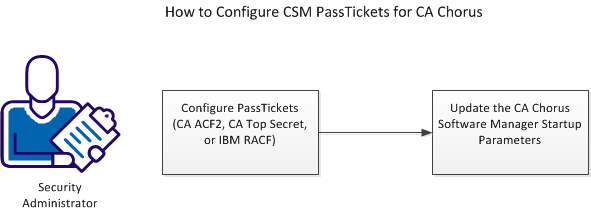
To launch and use CA CSM from CA Chorus, complete the following tasks:
Important! Verify that you use the same CA CSM applid that is used in CA Chorus.
|
Copyright © 2013 CA Technologies.
All rights reserved.
|
|